


How do I delete an email address on the LWS Panel?

Procédure

Introduction

We are going to show you how to delete an email address on the LWS Panel. It's a simple task, and we'll see that right away!

I. How do you delete an email address on LWS Panel?

Logging in to the LWS client panel.

Step 1 : You must first log in to your LWS client area in order to access your hosting management.

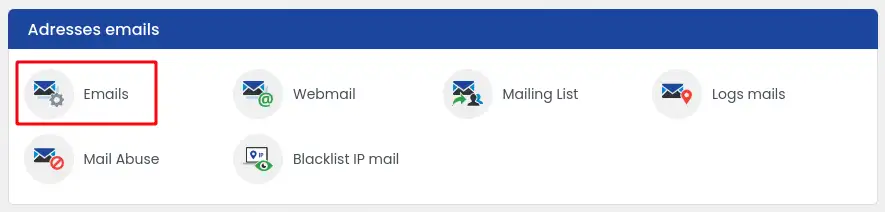
Step 2 : Once in your hosting management, locate the "Email addresses" section. Then, click on "Emails".

How do I delete an email address on the LWS Panel?

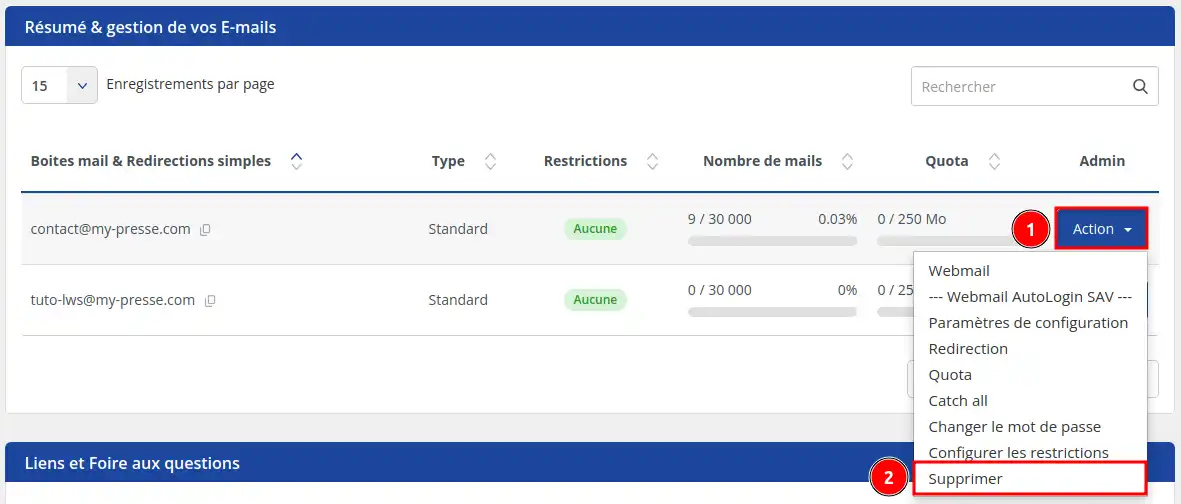
Then, choose the email address you wish to delete, then click on the 'Action'(1) menu on the right of the chosen email address and finally, click on 'Delete'(2)

How do I delete an email address on the LWS Panel?

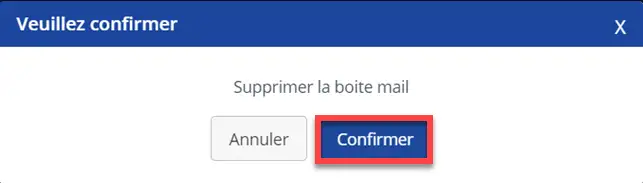
You will then need to confirm the deletion of the mailbox.

How do I delete an email address on the LWS Panel?

Finally, a notification will appear on the screen to confirm that the email address has been successfully deleted from your client area.

If you have inadvertently deleted your email address, you still have the option to recreate it and then recover the data via a backup. To restore or back up emails, you can follow this documentation.

Conclusion

You now know how to:

  • Access your LWS client area and manage your hosting.
  • Identify and navigate to the "Email addresses" section to find the email to delete.
  • Delete a specific email address on the LWS Panel by following the detailed steps.
  • Confirm the deletion and learn about restoration options in case of an error.

🛠 By applying these simple steps, managing your email addresses is just a click away. Remember that deletion is permanent, but if anything goes wrong, backups are there to save the day! 😌

Thank you for taking the time to read this article. Your experience is valuable, so feel free to share it with us! Leave a comment to tell us how your email deletion went or for any questions about the LWS service. 👇

help.lws.net/a/1556
Was this article helpful?

Yes

No

Read 157 504 times

Thank you! Feel free to ask questions about our documentation if you would like more information, and help us improve it.

Similar articles

Questions about the article 2

Ask a question
NALBY
26 Jun 2023
Bonjour je souhaite restaurer une adresse supprimée s'il vous plait
Benjamin-LWS Official answer
28 Jun 2023

Bonjour,

Merci de votre retour.

Si vous possédez une formule d'hébergement web avec LWS Panel  vous avez la possibilité de restaurer vos adresse-mail depuis votre espace client. (Fonctionnalité non disponible avec une formule domaine)

Voici une documentation qui vous aidera à restaurer vos mails depuis votre espace client : Comment sauvegarder ou restaurer vos emails ?

Si vous possédez une formule domaine, il faudra contacter le support technique afin qu'ils vous aident sur cette démarche. (Contacter le support LWS)

Je vous remercie de votre attention et reste à votre disposition pour toute autre question ou complément d'information.

Nous vous invitons à contacter notre service support à travers votre espace client, afin de vous apporter une aide si vous rencontrez des difficultés quelconque.

Cordialement, L'équipe LWS 

Was this answer helpful?
dtano
il y a 7 mois
comment annuler un mail ou rappeler un mail deja parti
Jordan-LWS Official answer
il y a 6 mois

Bonjour,

Malheureusement, il n’est pas possible d’annuler ou de rappeler un e-mail une fois qu’il a été envoyé.

En effet, dès que vous cliquez sur “envoyer”, le message est immédiatement transmis aux serveurs de messagerie du destinataire. Une fois qu’il a quitté votre boîte mail, vous n’avez plus de contrôle dessus, et il peut être reçu ou consulté à tout moment par le destinataire.

Certains services de messagerie proposent un court délai d’annulation (quelques secondes), mais au-delà de ce laps de temps, le message est définitivement envoyé.

N’hésitez pas si vous avez d’autres questions.

Cordialement, L'équipe LWS.

Was this answer helpful?

A question about this article?

Ask the LWS team and the community. Answers are published after moderation.

Ask the LWS team and its community a question

GDPR: Controller: LWS-Ligne Web Services. Purpose: moderation and public publication of your question, possible notification of an answer. Legal basis: consent (Art. 6(1)(a) GDPR). Email retention: 90 days after notification, 12 months maximum without an answer. To exercise your rights, see the GDPR section of our Terms and Conditions.