


How do I access the Roundcube Webmail for my LWS mail service?

Procédure

Introduction

Welcome to this documentation that will guide you step by step on how to access the Roundcube webmail of your LWS mail service. This resource will allow you to easily access your LWS mailbox. You will be able to consult, send, and manage your emails with ease.

I. How do I access Webmail via a URL?

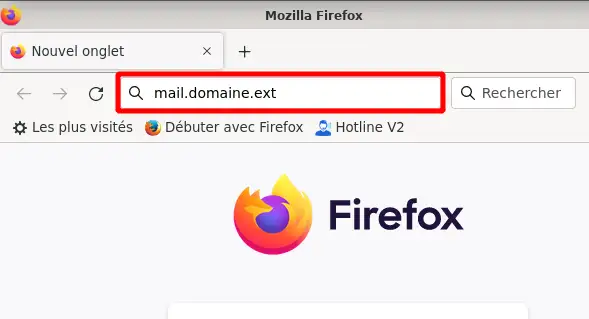
To access Roundcube webmail, simply open your web browser and enter the URL "mail.domaine.ext" in the address bar. (replace "domaine.ext" with the domain name of your email address)

How do I access the Roundcube Webmail for my LWS mail service?

This method is the fastest way to access Roundcube webmail. However, it requires knowing the URL used to access it, namely: "mail.domaine.ext" by replacing domaine.ext with the actual domain name.

II. How do I access Webmail from the LWS Panel?

Step 1 : First, you must log in to your LWS customer area in order to access the management of your hosting or your Pro mail service.

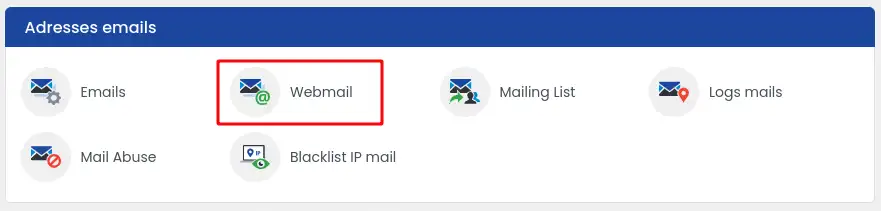
Step 2 : once in the management of your hosting, find the "Email addresses" section. Then, click on "Webmail".

How do I access the Roundcube Webmail for my LWS mail service?

III. How do I log in to webmail?

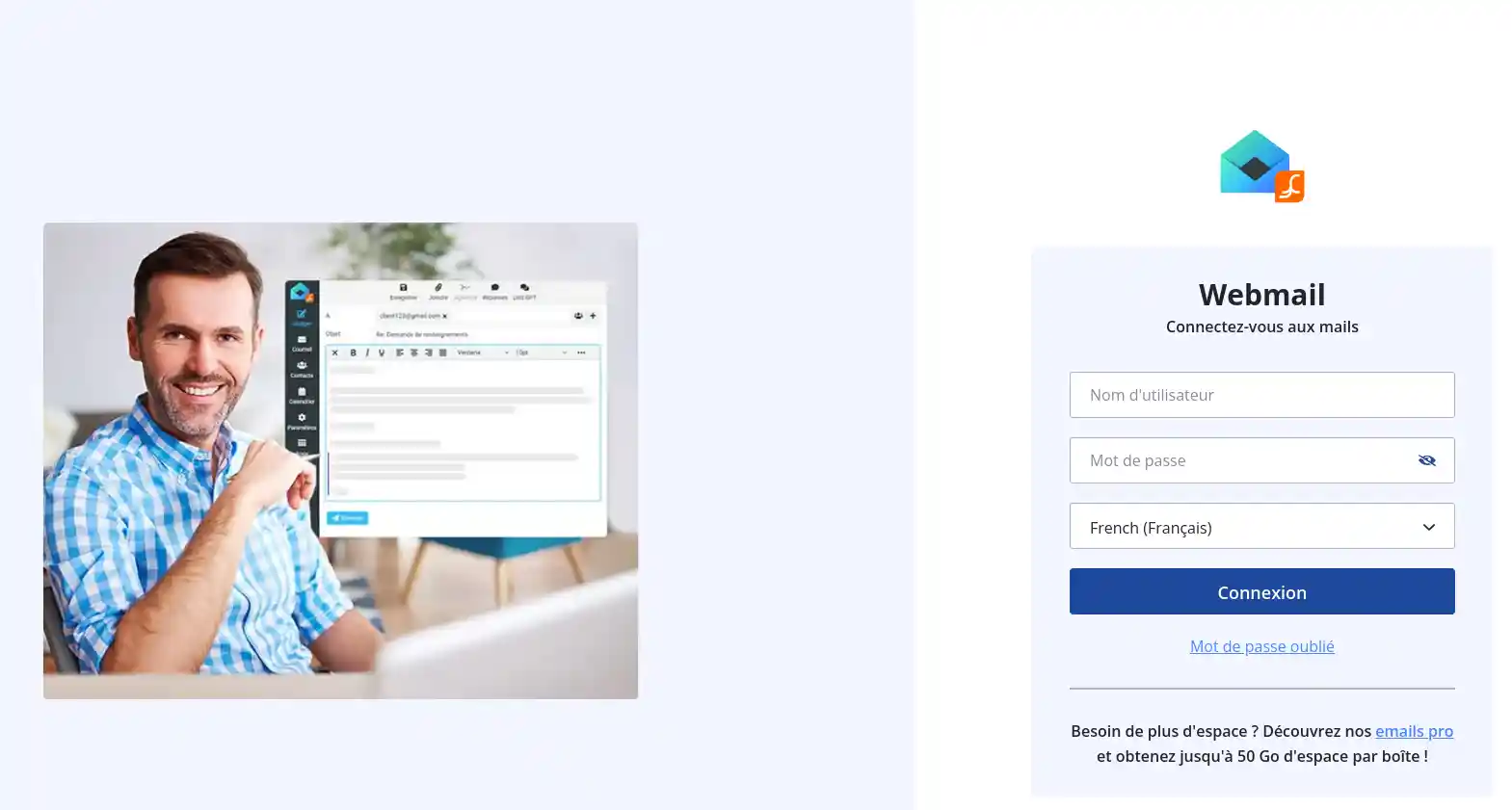
Once on the login page, enter your login credentials (full email address and password) then click on the "login" button to access webmail and your inbox.

How do I access the Roundcube Webmail for my LWS mail service?

IV. Connection problems

If you are having trouble logging in to your email address, check the following points:

  • Make sure you are connecting from the correct login URL belonging to your domain name.
  • Check that the email address has been created on your mail service; if not, create it by following this documentation
  • Check that your password is valid. If in doubt, change it by following this documentation

Conclusion

You now know how to:

  • Access Roundcube webmail via direct URL for quick email management 🌐
  • Use the LWS Panel to navigate to your webmail in just a few clicks 🔍
  • Log in to your webmail by correctly entering your credentials 🗝️
  • Resolve common connection problems for hassle-free access to your mailbox 🛠️

Thanks to this guide, Roundcube webmail no longer holds any secrets for you, and your email communication should now be smooth and efficient. If you have any questions or would like to share your experience with the LWS mail service, feel free to leave a comment. Your feedback is valuable, and we are here to help you get the most out of your digital tools. Thank you for reading and see you soon on LWS! 😊👋

help.lws.net/a/1069
Was this article helpful?

Yes

No

Read 185 571 times

Thank you! Feel free to ask questions about our documentation if you would like more information, and help us improve it.

Similar articles

Questions about the article 4

Ask a question
Paka1
20 Aug 2023
Comment installer lws webmail sur un smart Phone ?
Benjamin-LWS Official answer
21 Aug 2023

Bonjour, 

Merci de votre retour.

Actuellement, nous ne possédons pas d'application dédiée au webmail pour vos adresses mails.

Mais vous pouvez utiliser votre navigateur pour consulter vos mails depuis votre téléphone.

Utiliser le lien, mail.mon-domaine.fr pour aller vers le webmail de votre domaine (Remplacez mon-domaine.fr par votre domaine).

Je vous remercie de votre attention et reste à votre disposition pour toute autre question ou complément d'information.

Nous vous invitons à contacter notre service support à travers votre espace client, afin de vous apporter une aide si vous rencontrez des difficultés quelconque. (Contacter le support LWS)

Cordialement, L'équipe LWS 

Was this answer helpful?

Jko
20 Mar 2025
J'ai perdu mon MOT de PASSE ? Que puis-je faire pour le charger
Maxence-LWS Official answer
20 Mar 2025

Bonjour,

Je vous remercie pour votre message.

Je suis désolé d'apprendre que vous ayez perdu votre mot de passe.

S'il s'agit de votre mot de passe concernant l'espace client LWS, voici comment le réinitialiser :

https://aide.lws.fr/a/1642

Je vous remercie pour votre attention et reste à votre disposition pour toute autre question ou complément d'information.

Vous pouvez nous contacter au besoin depuis votre espace client ou sur cette page : https://www.lws.fr/contact.

Cordialement, L'équipe LWS

Was this answer helpful?
Pash
14 Jul 2025
comment faire pour avoir le pro format de l'abonnement pour 1 mois
Jordan-LWS Official answer
15 Jul 2025

Bonjour,

Si vous souhaitez souscrire à une offre d’e-mail professionnel pour une durée d’un mois, nous vous invitons à le faire directement via le lien suivant :
👉 https://www.lws.fr/adresses-emails-professionnelles.php

Il vous suffira de choisir l’offre la plus adaptée à vos besoins. Une fois sélectionnée, vous serez redirigé vers la page Panier où vous pourrez définir la durée à un mois.

Nous vous remercions pour votre confiance et restons à votre disposition pour toute question ou information complémentaire.

Cordialement, L'équipe LWS

Was this answer helpful?
Tdg
il y a 5 mois
Comment faire pour mettre une photo de profil?
Jordan-LWS Official answer
il y a 5 mois

Bonjour,

Pouvez-vous préciser de quel service ou outil vous parlez exactement concernant l’ajout d’une photo de profil ?

Cela me permettra de mieux comprendre votre demande et de vous orienter plus précisément.

Je vous remercie de votre attention et reste à votre disposition pour toute autre question ou complément d'information.

Cordialement, L'équipe LWS 

Was this answer helpful?

A question about this article?

Ask the LWS team and the community. Answers are published after moderation.

Ask the LWS team and its community a question

GDPR: Controller: LWS-Ligne Web Services. Purpose: moderation and public publication of your question, possible notification of an answer. Legal basis: consent (Art. 6(1)(a) GDPR). Email retention: 90 days after notification, 12 months maximum without an answer. To exercise your rights, see the GDPR section of our Terms and Conditions.