Procédure
Relevant service : Personalized Emails Hosting Plans LWS / ASP.NET / Mail Pro
Relevant panel : LWS Panel
Level : beginner
An email alias allows you to receive messages at a secondary address, without creating a new mailbox. For example, you can receive messages sent to info@yourdomain.fr directly in the main mailbox contact@yourdomain.fr.
This guide explains how to create an email alias from LWS Panel, how to check that it works, and how to delete it if you no longer need it.
This guide covers managing email aliases from LWS Panel.
Using another environment?
Understanding the role of an email alias
An email alias is an additional address linked to an existing mailbox.
It does not have its own password, its own storage space, or its own inbox. Messages sent to the alias automatically arrive in the main mailbox it is associated with.
Example: if you add the alias contact@yourdomain.fr to the mailbox marie@yourdomain.fr, messages sent to contact@yourdomain.fr will be received in the mailbox marie@yourdomain.fr.
An alias is mainly used to receive messages. In Roundcube, replies are sent only with the main email address used for login. To send with an alias address, you must use a compatible email client such as Thunderbird, Outlook, or Mail on Mac, if it allows adding a sending identity.
Before you begin
To create an alias, you must already have a mailbox to which this alias will be linked.
The address chosen for the alias must not already be used as a mailbox, redirect, or another alias.
The number of available aliases depends on your plan. Most plans allow up to 100 aliases per domain. A domain name plan without an option is limited to 1 alias.
Create an email alias
- Log in to your LWS customer area.
- Go to the management of your hosting or your Mail Pro service.
- In the Email addresses section, click on Emails.
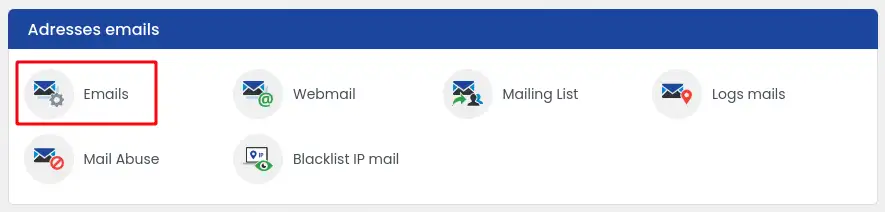
- Find the mailbox on which you want to add an alias.
- Click the Action button on the row for this address, then click Add an Alias.
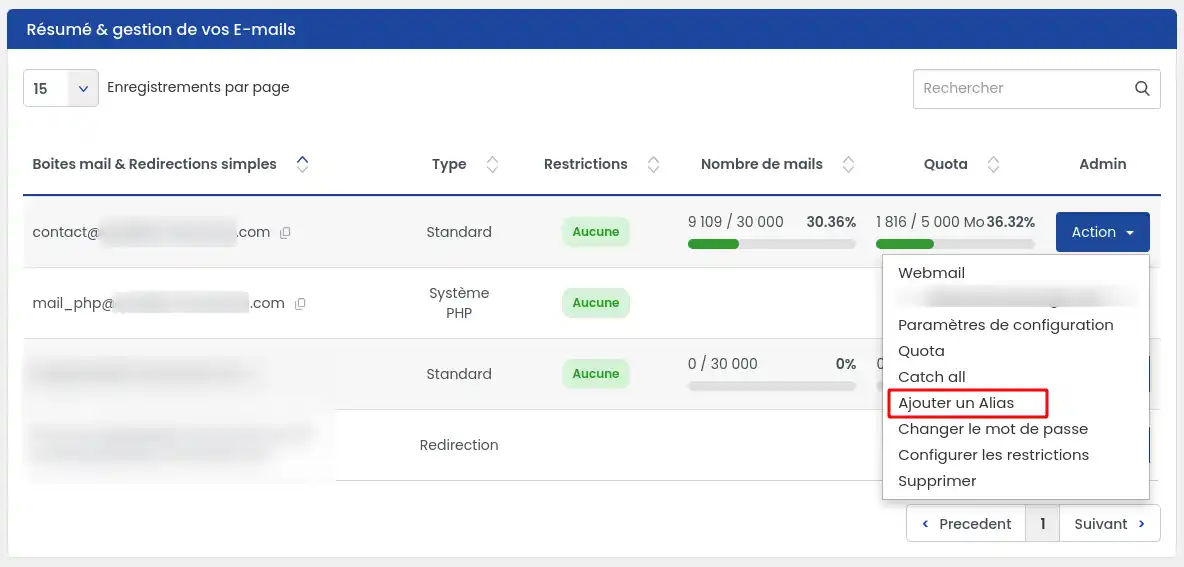
- In the field provided, enter only the name of the alias to create.

For example, to create the address contact@yourdomain.fr, enter only contact.
- Click Confirm to save the alias.
The alias is created when it appears in the list of aliases associated with the main mailbox.
Check that the alias works
Send a test message to the alias address you just created.
Then open the main mailbox associated with this alias, from Roundcube or from your usual email client.
If the message arrives in this mailbox, the alias is working correctly.
A correctly configured alias receives messages in the main mailbox it is linked to.
Delete an email alias
- From the management of your hosting or your Mail Pro service, open the Email addresses section, then click on Emails.
- Find the mailbox to which the alias is linked.
- Click Action, then Add an Alias.
- In the list of existing aliases, find the alias to delete.
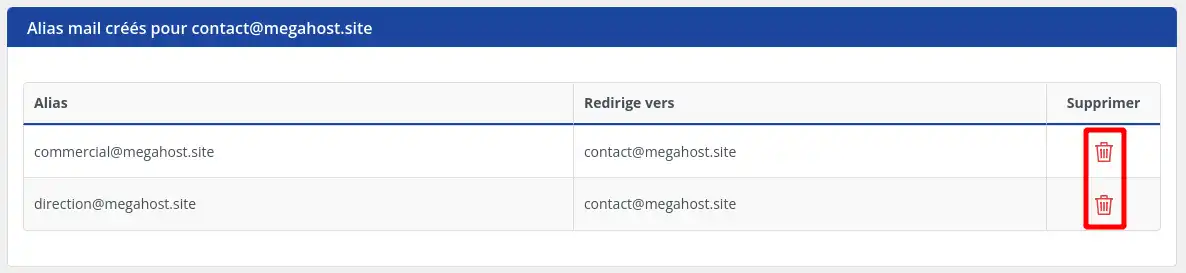
- Click the red trash bin icon on the row of the alias concerned.
- Confirm the deletion if you are asked to confirm.
After deletion, future messages sent to this alias will no longer be received by the main mailbox.
Common issues
I don't see the “Add an Alias” button
Make sure you are in the Email addresses > Emails section and that you clicked the Action button for an existing mailbox.
If no mailbox exists yet on the domain, first create a main email address before adding an alias.
The alias does not receive messages
Check that the alias appears in the list of aliases for the main mailbox.
Also make sure the address used for the test exactly matches the alias created. A mistake in the name or domain prevents the message from being received.
If the domain has just been configured or modified, wait until the mail services are fully operational.
I want to reply with the alias address from Roundcube
Roundcube does not allow creating an additional identity to send or reply with an alias address.
When you are logged into Roundcube with a main email address, replies are sent only with this main address. The alias allows messages to be received, but it cannot be used as a sending address in Roundcube.
To send with an alias address, use a compatible email client such as Thunderbird, Outlook, or Mail on Mac. These clients may allow you to add an additional sending identity, depending on their configuration.
I can't create an additional alias
Your plan may have reached the allowed alias limit. Delete an unused alias or check the limits included in your plan.
Also check that the desired address does not already exist as a mailbox, redirect, or alias.



 Yes
Yes No
No About
About 