
Online help
The web host accessible to all
Procédure
Service concerned : email addresses attached to a domain name or a Mail Pro service
Panel concerned : LWS Panel
Level : beginner
An email redirection allows you to receive messages sent to an address on your domain at another email address.
For example, you can create the address [EMAIL] and automatically forward messages to your usual personal or professional email address.
This help explains how to create a simple redirection from the LWS Panel. A simple redirection does not create a mailbox: it only forwards messages to the chosen destination address.
This help concerns creating an email redirection from the LWS Panel.
Are you using another environment or do you have a different need?
Before creating your redirection, check the type of address you need.
If you simply want to forward messages to another address, without keeping a copy in a mailbox [ADDRESS], create a simple redirection with this help.
If the address already exists as a mailbox, or if you want to keep a copy of the messages in that mailbox, instead use a redirection from Roundcube.
A simple redirection does not have a inbox. Messages are forwarded [ADDRESS], but no copy is kept in an LWS mailbox.
Log in to your LWS customer area, then open the management of the domain or mail service concerned.
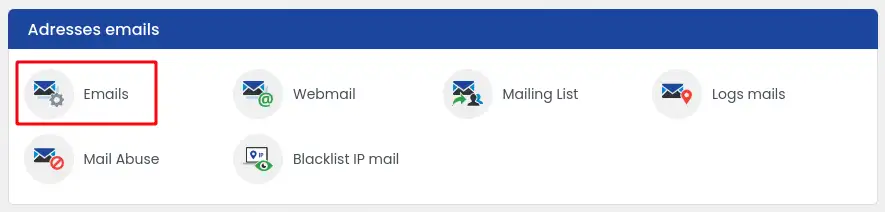
In the email management section, click the link allowing access to the creation of email addresses: section "Email addresses". [PERSON_NAME], click "E-mails"
Then select the E-mail redirection option.
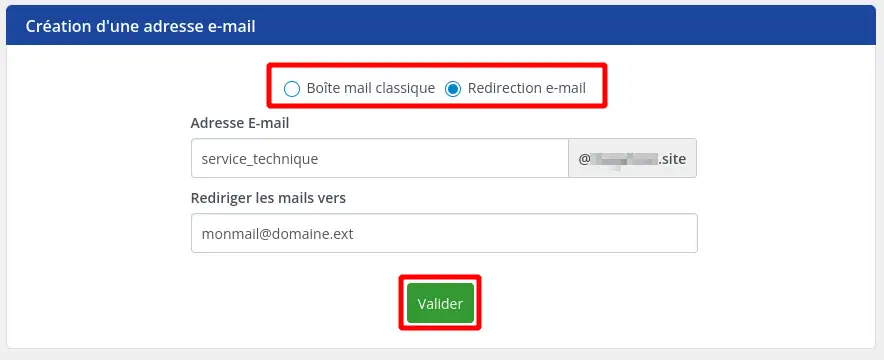
In the field provided for the address to create, enter the name of the address that will receive the messages.
For example, if you want to create [EMAIL], enter only contact if the domain name is already displayed to the right of the field.
In the destination field, enter the email address [PERSON_NAME] messages should be forwarded to.
Check carefully [PERSON_NAME], then validate the creation.
The redirection is created when the address appears in the list of your email addresses. Messages sent to this address will automatically be forwarded to the destination address indicated.

Send a test email to the redirection address you just created.
Then open the inbox of the destination address.
If the message arrives at that address, the redirection is working correctly.
Some mail providers may classify redirected emails as spam. [PERSON_NAME] test, also check the spam or junk mail folder of the destination address.
From the email management of your domain, search for [PERSON_NAME] redirection in the list of existing addresses.

Then use the actions available on the row for the address concerned to change the destination or delete the redirection.
[bcolor_red]
Deleting a redirection prevents new messages sent to this address from being forwarded. Make sure this address is no longer used before deleting it.
[/bcolor]
I am not receiving redirected emails
Start by sending a new test message from an external address.
Then check that the destination address does not contain an error and that the message has not arrived in spam.
If the destination is a Gmail address, [PERSON_NAME], Yahoo or another external provider, the message may sometimes be filtered by their anti-spam system.
[PERSON_NAME] already
A simple redirection cannot be added to an existing mailbox from the [ADDRESS] Panel.
In this case, use a redirection from Roundcube. This method makes it possible to forward messages received by the mailbox, while keeping the existing mailbox depending on the chosen configuration.
I want to keep a copy of the emails on LWS
Do not create a simple redirection.
Create or use a real mailbox, then set up a redirection from Roundcube. [PERSON_NAME] allows you to manage forwarding from the mailbox itself.
[PERSON_NAME] emails to several people
A simple redirection is designed for forwarding to a single destination address.
To send messages to multiple recipients, use a suitable method, such as a redirection with rules from Roundcube or a mailing list depending on your need.
[PERSON_NAME] redirection
Make sure you are [PERSON_NAME] the domain concerned.
If you use cPanel, Plesk or another environment, the procedure is not the same as on the LWS Panel.
Ask the LWS team and the community. Answers are published after moderation.
 About LWS :
LWS is a 100% French web hosting company that focuses on quality and innovation and offers a responsive and competent technical service at affordable prices.
About LWS :
LWS is a 100% French web hosting company that focuses on quality and innovation and offers a responsive and competent technical service at affordable prices.



 Yes
Yes No
No