Procédure
Service concerned : Customized Emails LWS / ASP.NET / Mail Pro hosting plans
Panel concerned : LWS Panel
Level : beginner
An email alias allows you to receive messages at a secondary address without creating a new mailbox. For example, you can receive messages sent to info@votredomaine.fr directly in the main mailbox contact@votredomaine.fr.
This help explains how to create an email alias from LWS Panel, how to check that it works, and how to delete it if you no longer need it.
This help concerns managing email aliases from LWS Panel.
Are you using another environment?
Understanding the role of an email alias
An email alias is an additional address linked to an existing mailbox.
It does not have its own password, its own storage space, or its own inbox. Messages sent to the alias automatically arrive in the main mailbox it is associated with.
Example: if you add the alias contact@votredomaine.fr to the mailbox marie@votredomaine.fr, messages sent to contact@votredomaine.fr will be received in the mailbox marie@votredomaine.fr.
An alias is mainly used to receive messages. In Roundcube, replies are sent only with the main email address used to log in. To send using an alias address, you must use a compatible email client such as Thunderbird, Outlook or Mail on Mac, if it allows you to add a sending identity.
Before you begin
To create an alias, you must already have a mailbox to which this alias will be linked.
The address chosen for the alias must not already be used as a mailbox, redirection, or another alias.
The number of available aliases depends on your plan. Most plans allow up to 100 aliases per domain. The domain plan (domain name without hosting) does not allow you to create aliases: it includes 1 email redirection and catch-all. With this redirection, you can for example forward messages sent to contact@votredomaine.fr to direction@votredomaine.fr (see How do I create an email redirection with LWS Panel?). To receive messages sent to non-existent addresses on the domain in a mailbox, enable catch-all from the Actions button of that mailbox, then Catch all > Enable.
Create an email alias
- Log in to your LWS customer area.
- Access the management of your hosting or your Mail Pro service.
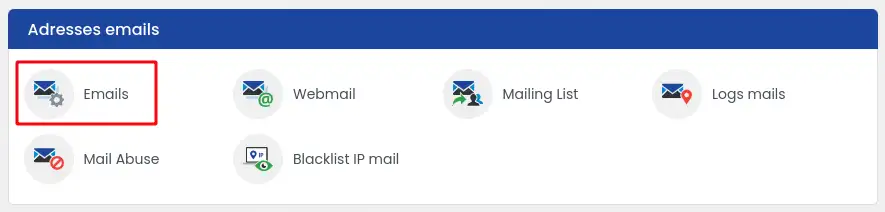
- In the Email addresses section, click Emails.
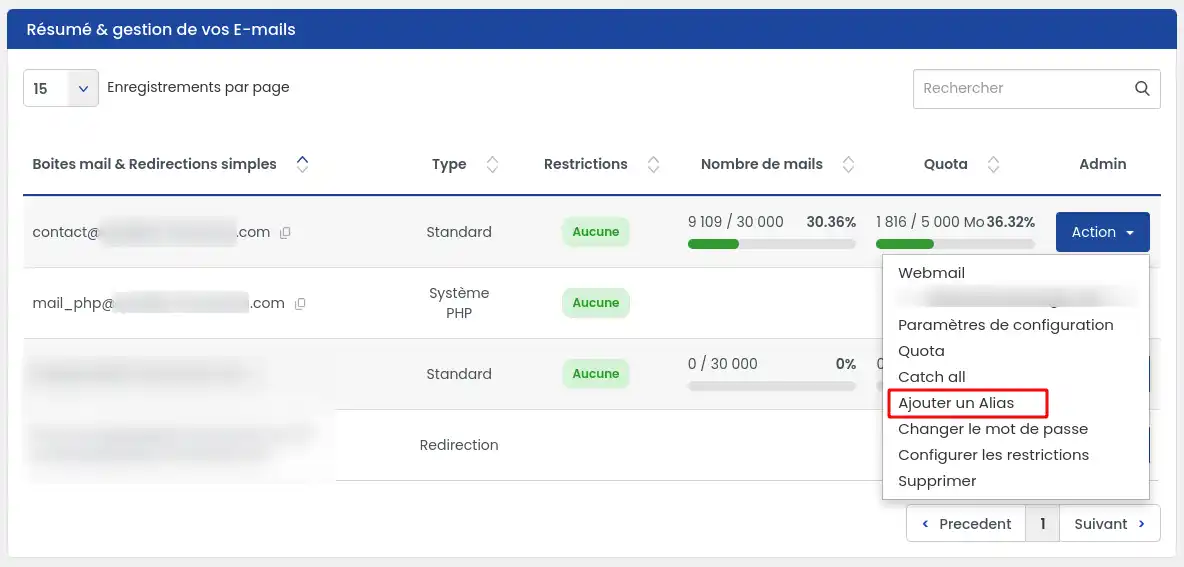
- Find the mailbox to which you want to add an alias.
- Click the Action button on the line of this address, then click Add an Alias.
- In the field provided, enter only the name of the alias to create.

For example, to create the address contact@votredomaine.fr, enter only contact.
- Click Validate to save the alias.
The alias is created when it appears in the list of aliases associated with the main mailbox.
Check that the alias works
Send a test message to the alias address you just created.
Then open the main mailbox associated with this alias, from Roundcube or from your usual email client.
If the message arrives in this mailbox, the alias is working correctly.
A correctly configured alias receives messages in the main mailbox to which it is linked.
Delete an email alias
- From the management of your hosting or your Mail Pro service, open the Email addresses section, then click Emails.
- Find the mailbox to which the alias is linked.
- Click Action, then Add an Alias.
- In the list of existing aliases, find the alias to delete.
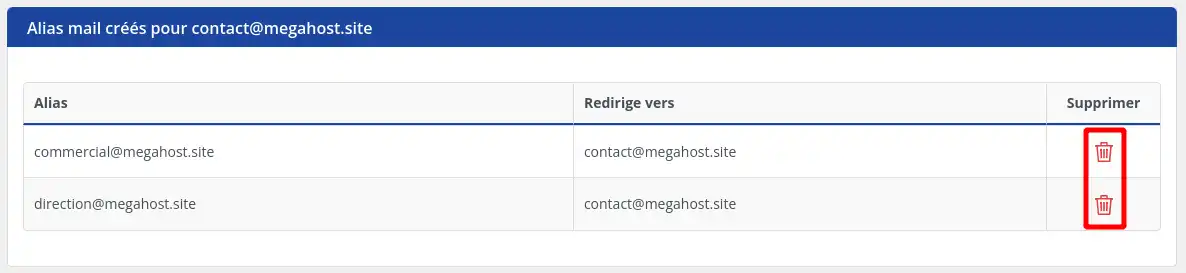
- Click the red trash can icon on the line of the relevant alias.
- Confirm deletion if you are asked to confirm.
After deletion, future messages sent to this alias will no longer be received by the main mailbox.
Common issues
I do not see the “Add an Alias” button
Make sure you are in the Email addresses > Emails section and that you clicked the Action button for an existing mailbox.
If no mailbox exists yet on the domain, first create a main email address before adding an alias.
On a domain plan, the Add an Alias entry does not exist: this plan does not allow aliases to be created. Use its email redirection or catch-all instead.
The alias does not receive messages
Check that the alias appears in the list of aliases for the main mailbox.
Also make sure that the address used for the test exactly matches the alias created. An error in the name or domain prevents the message from being received.
If the domain has just been configured or modified, wait until the mail services are fully operational.
I want to reply using the alias address from Roundcube
Roundcube does not allow you to create an additional identity to send or reply with an alias address.
When you are logged in to Roundcube with a main email address, replies are sent only with this main address. The alias allows you to receive messages, but it cannot be used as a sending address in Roundcube.
To send using an alias address, use a compatible email client such as Thunderbird, Outlook or Mail on Mac. These programs may allow you to add an additional sending identity, depending on their configuration.
I cannot create an additional alias
Your plan may have reached the allowed alias limit. Delete an unused alias or check the limits included in your plan.
Also make sure that the desired address does not already exist as a mailbox, redirection, or alias.



 Yes
 No
 About
